Back Up Purchased Originals and Verify a Restore
A backup needs a retrieval check, not just a copy-completed message. Preserve purchase records and checksum notes alongside originals so you can identify and test a release even when redownloading is unavailable.
Published · Updated · FaultNote editorial policy
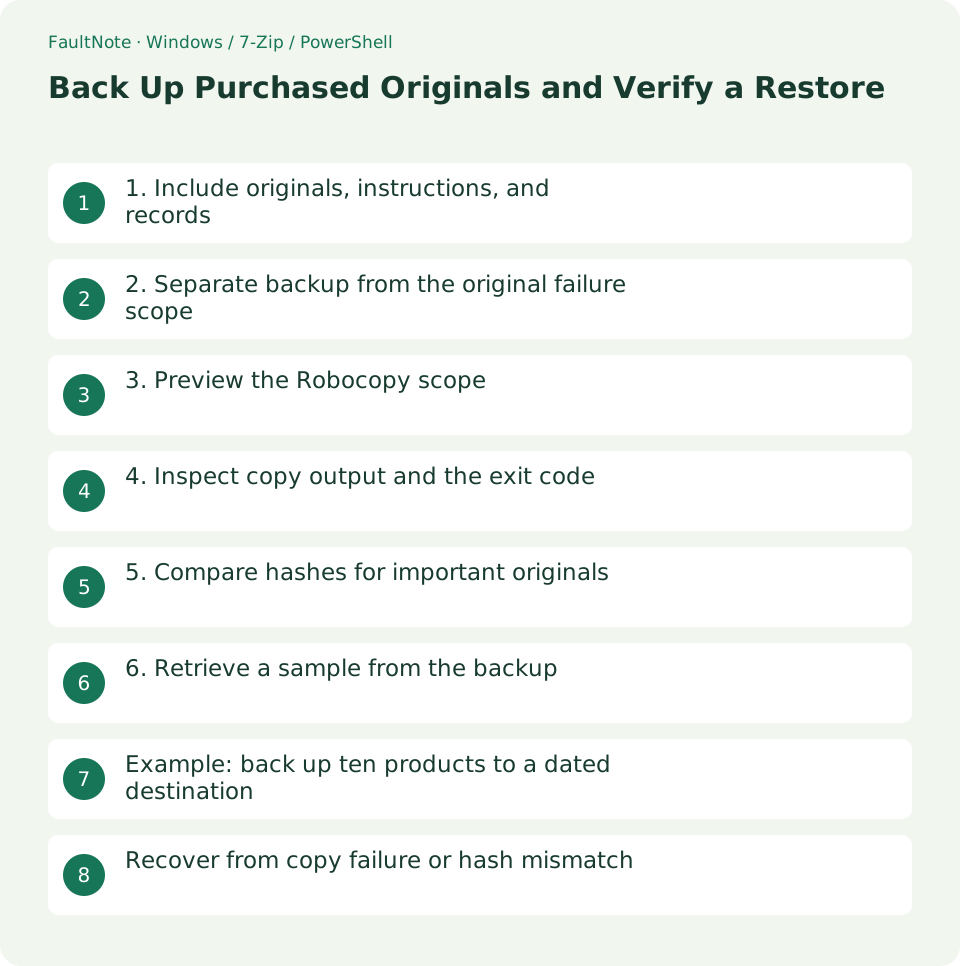
Who this guide is for and what to prepare
- People retaining purchased files independently of redownload access
What you need
- Collect originals and the register, and prepare a separate backup destination
- Check source and destination paths and prepare an empty restore-test folder
1. Include originals, instructions, and records
Include archives, all split volumes, instructions, license text, release notes, and the purchase register. Prioritize originals that recreate the delivered state. Add your own work and saves as separately identified backup scope.
Redownload terms and availability vary by store and product. Verify the actual purchase instructions rather than assuming indefinite access. Avoid collecting unnecessary payment or personal details in the register.
2. Separate backup from the original failure scope
A second folder on the same drive can help with accidental edits but not that drive failing. Copy to a separate destination and consider a disconnected or separately located copy where appropriate; this workflow does not require a particular hardware purchase.
Synchronization can propagate deletions and changes. Check retained history or a disconnected copy rather than assuming a synced folder keeps previous releases. If encrypted, plan where the restore key will be available.
3. Preview the Robocopy scope
The example uses /L to list the planned copy from D:/PurchasedOriginals to X:/LibraryBackup/2026-10-13. Replace X with the real destination and verify that it is neither the source nor an unintended drive. /E includes empty subfolders.
This copy omits /MIR and /PURGE. A new dated destination avoids carrying a mistaken source deletion into an existing backup. Account for the storage cost of retained dated copies separately.
robocopy 'D:\PurchasedOriginals' 'X:\LibraryBackup\2026-10-13' /E /COPY:DAT /DCOPY:T /R:2 /W:2 /L4. Inspect copy output and the exit code
After reviewing the plan, remove only /L to perform the copy. /R:2 and /W:2 limit retry attempts and waiting. Inspect skipped and failed counts rather than marking the backup complete while ignoring errors.
Robocopy uses special exit codes: 8 or higher indicates at least one copy failure, while lower values can describe copied files, extra files, or mismatches. Inspect the summary and confirm that the intended originals exist at the destination.
robocopy 'D:\PurchasedOriginals' 'X:\LibraryBackup\2026-10-13' /E /COPY:DAT /DCOPY:T /R:2 /W:2
$LASTEXITCODE5. Compare hashes for important originals
Select an important large archive and a split set, then compare source and destination SHA-256 values. Counts and sizes alone do not establish readable identical content. Treat read errors as unresolved checks.
Avoid changing originals during verification. For a mismatch, check release and copy time before recopying. Keep a copy of the checksum record separate from the source location.
6. Retrieve a sample from the backup
Copy one complete product from the backup into an empty restore-test folder. Retrieve every volume of a split set, test it with 7-Zip, and extract needed files. Check that the backup alone provides the original and instructions without relying on the source library.
Record the product ID, release, date, and result. If retrieval fails, retain the source while investigating missing files, keys, or damage. Distinguish a checked sample from the untested remainder rather than claiming every product was restored.
Example: back up ten products to a dated destination
For ten products, prepare an empty dated destination and review source product IDs, file counts, and volumes. If the register or instructions are elsewhere, include them deliberately or define a separate backup scope.
Inspect /L output for the intended roots and files. Use another dated or trial destination if the selected one already holds a release you want to preserve. Resolve scope and destination mistakes before copying.
After copying, check all ten product folders and complete volume counts. Hash-check important files with different characteristics, such as a large archive and a small audio file, and record the exact sample IDs and names.
Retrieve ITEM-123 from the backup to a restore-check folder and test and extract without returning to the source. Record the ten-product copy and the one-product restore as separate verified scopes.
Recover from copy failure or hash mismatch
For exit code 8 or higher, inspect failed counts and the first concrete error. Check space, connection, access, and source use, then identify the failed files. Inspect one failure before repeatedly rerunning the entire job.
After reconnecting a destination, verify its identity using the volume name and expected folders rather than drive letter alone. Reread both command paths to avoid reversing source and destination.
For a hash mismatch, check changes during copying and release identity. If the source itself fails testing, recopying it does not create a complete original. Seek a known-good independent copy or legitimate redownload and label the problematic copies distinctly.
If retrieval fails for lack of a key or password, record file presence separately from usability. Manage keys securely and repeat the restore check. After fixing a failure, state whether copying, hashing, and retrieval were all checked again.
Scroll horizontally to see the full table →
| Situation | Next check |
|---|---|
| Copy completed only | Inspect destination and failure counts |
| Hashes match | Record matching content for checked files |
| Retrieval and extraction succeed | Record product and release restore result |
Limitations and requirements
- Keep source originals until the restore check is complete
- This file backup does not guarantee restoration of an installed application
Frequently asked questions
Must I hash every file on every run?
Choose according to assurance needs and available time. Prioritize new and important originals, and distinguish complete checks from sampling.
Can a purchase register restore files by itself?
The register supports identification and support requests. It cannot reconstruct missing file data or replace required keys.
Dated copies consume too much space
Define retained generations and releases, then clear old copies while retaining verified recovery copies. Do not remove the last known-good copy merely to save space.
Should the encryption key be stored beside the backup?
A single shared location can make both inaccessible at once. Manage confidentiality and recovery access separately and test retrieval with that arrangement.
Sources and verification date
Sources checked: . These sources support the specifications, procedures or prices discussed here. Check each source for applicable conditions and current information.
Related practical guides
- Check Purchased ZIP and 7z Downloads Before Extraction
- Review Duplicate Purchased Files with SHA-256
- Create a Searchable CSV Inventory of Purchased Files
- Organize Purchased Downloads: Originals, Working Copies, and Update Records
- Manage Purchased Game Updates in Separate Release Folders
- Extract Split Downloads: Recognize Volumes and Keep the Complete Set