Air cooler or AIO? Choose by case clearance, noise and maintenance
Start with cooling performance for your workload and dimensions that actually fit the case. Air is a useful starting point when simple replacement parts matter. A larger AIO can be a candidate for sustained heavy loads if its radiator fits. Cooling type alone does not determine noise or lifespan.
Published · Updated · FaultNote editorial policy
Who this guide is for and what to prepare
- People choosing a separate CPU cooler for the first time
- Builders checking whether a large air cooler or AIO fits their case
What you need
- Record the CPU, normal workload, power settings and case model
- Find RAM height, maximum cooler height and supported radiator positions
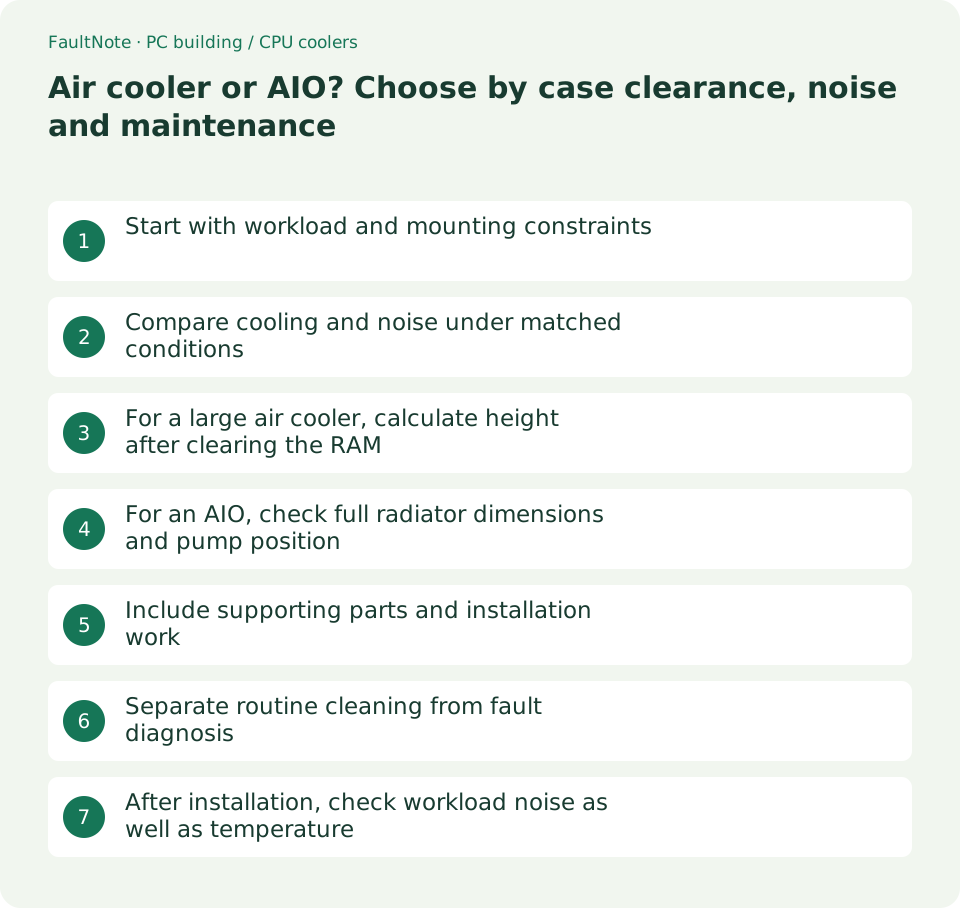
Start with workload and mounting constraints
An air cooler uses fans on a heatsink above the CPU; an AIO circulates coolant to a radiator elsewhere in the case. Both need case airflow. The table compares buying considerations, not universal temperature rankings or failure rates.
Scroll horizontally to see the full table →
| Decision | Air cooler checks | AIO checks |
|---|---|---|
| Gaming and everyday work | Check thermals and noise at a similar CPU load | Check the need for a larger system, beyond appearance |
| Sustained heavy load | Check cooling headroom and fan speed | Compare measurements for the radiator size |
| Internal space | Height, RAM and clearance near the upper PCIe area | Radiator and fan thickness plus tubing route |
| Noise | Compare temperatures at matched noise levels | Include pump sound as well as fans |
| Cleaning | Access to fans and heatsink fins | Access to both sides of the radiator |
| Replacement | Availability of compatible fans and brackets | Warranty support for the assembly and pump |
| Total cost | Include brackets and extra fans | Include any case, fans or control hardware required |
Compare cooling and noise under matched conditions
In GamersNexus's July 2024 measurements, the Liquid Freezer III 360 had a P-core temperature rise over ambient 9.7°C lower than the NH-D15 G2 HBC at a matched noise level and a 250W load on a Core i9-14900KF. That result applies to those products and conditions, not every AIO and air cooler.
Do not directly transfer that heavy-load result to a gaming-only PC. Read measured reviews with attention to CPU, power settings, temperature above ambient and fan control, and separate idle sound from sustained-workload sound. A manufacturer's cooling-wattage or quietness claim is not an independent comparison.
For a large air cooler, calculate height after clearing the RAM
Noctua's NH-D15 G2 FAQ specifies RAM up to 32mm tall with the front fan in its normal position and an overall cooler height of 168mm. Raising that fan to clear taller RAM also requires more clearance in the case.
As a sizing example, 44mm RAM needs a 12mm fan lift, giving an estimated total height of 180mm. A case with a 170mm cooler limit therefore does not fit merely because the cooler's headline dimension is 168mm. This calculation applies to raising the front fan on that model.
If considering one fan or a different fan size, check the manufacturer's supported arrangement and cooling trade-off. Also check VRM heatsinks, space toward the GPU and access to fan clips for the exact motherboard and case combination.
For an AIO, check full radiator dimensions and pump position
A case listing 360mm support does not by itself guarantee fit for every 360mm radiator. For example, the Liquid Freezer III 360 lists a radiator measuring 398 × 120 × 38mm. The 38mm excludes fans, so also inspect the drawing's maximum thickness with fans installed.
For a top mount, check RAM, VRM and EPS power-cable clearance; for a front mount, check remaining GPU length. Tubing must reach without sharp bends or pressure from fans and panels. A different mounting position can also change the arrangement of your remaining case fans.
CORSAIR's guidance for designs with a CPU-block pump places the radiator's highest point above the pump and shows a front mount with tubing connections at the bottom. Pump locations can differ between products, so use the specific manual to choose an arrangement that avoids collecting air in the pump.
Include supporting parts and installation work
Compare the cooler plus socket brackets, additional fans, any required control hardware and, if necessary, a different case. If a radiator requires replacing the case, check whether that spending would change your CPU or GPU choice.
Do not decide wiring from header names alone. Products such as the Liquid Freezer III offer combined or individual control cables, changing the required connections and monitored speeds. Match the product manual to the board's current limits and PWM/DC settings.
- Fix the exact case and motherboard models and open their dimensional information
- Match the CPU socket to the included mounting hardware
- Check adjusted air-cooler height or the radiator-and-fan arrangement
- List required headers, power connections, PWM/DC settings and extra parts
- Compare total spending, warranty handling and access to replacement parts
Separate routine cleaning from fault diagnosis
Both types need checks for dust on filters, fans and cooling fins. CORSAIR's sealed-AIO guidance does not include refilling or draining coolant as routine maintenance. Do not open a sealed model on your own; follow that product's documentation.
The table provides initial triage. Spinning fans do not establish normal coolant circulation, while a missing RPM display alone does not establish failure. Check which component the selected wiring actually monitors.
Scroll horizontally to see the full table →
| Symptom | Check first | Next step |
|---|---|---|
| Temperatures or noise rise gradually | Dust, airflow and whether workload changed | If cleaning does not help, inspect mounting and controls |
| Air-cooler fan does not run | Power off and check wiring and obstructions | Consider a compatible replacement fan or support |
| Persistent AIO noise | Mounting, tubing and the RPM being monitored | Contact support if manual-guided checks do not resolve it |
| Rapid heating or repeated shutdowns | Stop the workload and shut down | After cooling, check wiring and contact; stop use if it persists |
| Visible leakage or wet components | Turn off the system and disconnect power | Report the condition to support without restarting |
After installation, check workload noise as well as temperature
Follow the installation instructions for protective films, thermal compound, mounting and wiring before startup. First check BIOS readings and light use, then observe temperature and sound during your usual games or production tasks.
Record room temperature, CPU settings, workload and fan or pump settings for comparisons. A warranty period is not a measured lifespan, and cooling type alone does not determine quietness. Dimensions and instructions were checked on September 12, 2026; thermal measurements come from the identified third-party test.
- Verify assembly and wiring against the manual before applying power
- Check startup temperature and available fan or pump RPM readings
- Move from light use to your normal workload and record noise and temperature changes
- Compare with previous records under the same conditions and stop the workload if abnormal
Limitations and requirements
- A cooling-wattage label or cooling type does not guarantee temperature, quietness or lifespan for a particular CPU.
- Dimensional examples apply to the named products. Recheck your exact cooler, case and RAM.
- Do not continue loading a system to test it when it heats rapidly or shows leakage.
Frequently asked questions
Is an AIO always quieter than an air cooler?
No. Radiator fans, pump sound, CPU load and speed settings all matter. Check matched-noise thermal measurements as well as idle acoustics.
Will any 360mm AIO fit a case with 360mm support?
Check actual radiator length and thickness, fans, and clearance to RAM or the GPU. Front and top mounting positions may have different restrictions.
Does an AIO need regular coolant refills?
Sealed models commonly exclude refilling from routine maintenance. Clean dust and monitor cooling; refill or disassemble only if the specific product's official instructions allow it.
Sources and verification date
Sources checked: . These sources support the specifications, procedures or prices discussed here. Check each source for applicable conditions and current information.
- Noctua: NH-D15 / G2 case and RAM compatibility FAQ ↗
- ARCTIC: Liquid Freezer III 360 specifications ↗
- ARCTIC: Liquid Freezer III 360 dimensional drawing ↗
- ARCTIC: Liquid Freezer III 360 user manual ↗
- CORSAIR: AIO radiator mounting positions ↗
- CORSAIR: maintaining an AIO ↗
- GamersNexus: measured NH-D15 G2 cooler comparison, July 2024 ↗
- ARCTIC: manufacturer warranty ↗
Related practical guides
- PCIe 4.0 or 5.0 SSD for gaming? Check load times, capacity and slot sharing
- ATX vs microATX vs Mini-ITX: choose a PC case and motherboard
- CPU value in Japan, September 2026: five gaming candidates ranked
- GPU value ranking, September 2026: ten models at Japanese retail prices
- DDR4 vs. DDR5: Choose for a New Build, Reused RAM and Upgrade Cost
- Integrated vs. Discrete Graphics: Check Workloads, CPU Models and Outputs